
环境搭建
安装
Go 下载地址
进不去用这个
检查是否安装成功
go.exe version环境变量
path:安装位置\go1.25.5.windows-amd64\go\bin
ide
这里我使用的是 GoLand
激活
https://github.com/zpj80231/idea-set
变量的定义
项目的创建
file➡new project➡environment
environment 设置代理地址
GOPROXY=https://goproxy.cn,direct项目结构
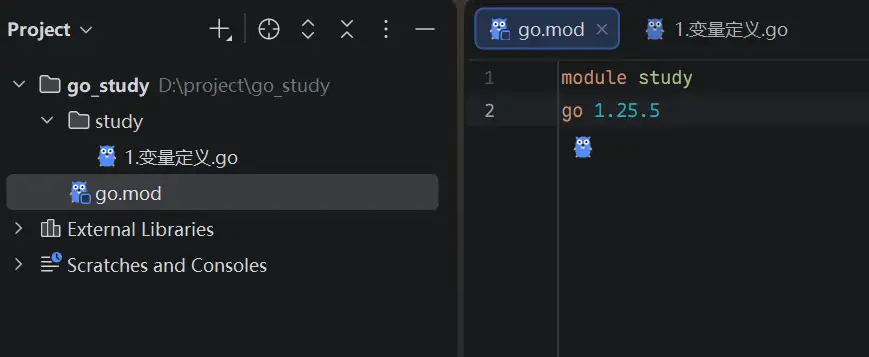
mod 文件不是很懂,后面再深入学习
和 java 有点像,只有 main 包才能运行
Hello World
package main
import "fmt"
func main() { fmt.Println("hello world")}变量赋值
package main
import "fmt"
func main() { // 先声明 var name string // 再赋值 name = "张三" // 使用 fmt.Println(name)
// 声明并赋值 var age int = 18 // 可以省略数据类型 var height = 1.68 // 短声明 weight := 80.5}和 ts 类似,可以推导数据类型
注意点:
-
在函数外声明全局变量需要用 var 关键字
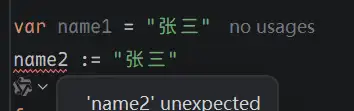
-
声明但是没有使用会编译不过
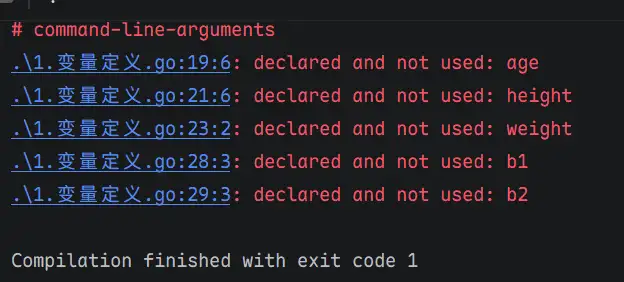
// 多个变量赋值var a1, a2 = 1, 2// 一般用在函数外面var( b1 string = "张三" b2 int = 18)常量
关键字const声明之后就不能修改了,声明必须赋值
// 常量const c1 = "张三"命名规范
要跨包访问需要使用首字母大写
package version
const version1 = "0.0.1"const Version2 = "0.0.1"
输入和输出
输出
fmt.Println()可以打印多个变量,中间空格,自带换行
fmt.Println("hello", "world")fmt.Println("你好")hello world你好fmt.Printf()格式化输出,不带换行符
fmt.Printf("%s hello world", "你好")fmt.Printf("%s 你好", "hello world")你好 hello worldhello world 你好格式化字符串
| 符号 | 意义 | 例 | 输出 |
|---|---|---|---|
| %s | 字符串 | fmt.Printf(“%s hello world”, “你好”) | 你好 hello world |
| %d | 整数 | fmt.Printf(“%d”, 2125) | 2125 |
| %f | 浮点数 | fmt.Printf(“%.2f”, 3.1415926) | 3.14 |
| %T | 类型 | fmt.Printf(“%T”, 3.1415926) | float64 |
| %v | 任意 | fmt.Printf(“%v”, 3.1415926) | 3.1415926 |
| %#v | 输出格式(适合打印空字符串) | fmt.Printf(“%#v”, “”) | “” |
fmt.Sprintf()格式化输出内容赋值给变量
var f = fmt.Sprintf("%.2f", 3.1415926)fmt.Println(f)3.14输入
fmt.Println("请输入你的名字:")var name stringfmt.Scan(&name)fmt.Println("hello", name)请输入你的名字:aahello aa