Cesium三维风场可视化(上):风场数据获取与处理
AI-摘要
Yuan GPT
AI初始化中...
介绍自己 🙈
生成本文简介 👋
推荐相关文章 📖
前往主页 🏠
前往爱发电购买
Cesium三维风场可视化(上):风场数据获取与处理
SEAlencehe数据下载
手动数据下载
这里我使用的是贾宛龙大佬案例里给的地址下载数据源https://nomads.ncep.noaa.gov/
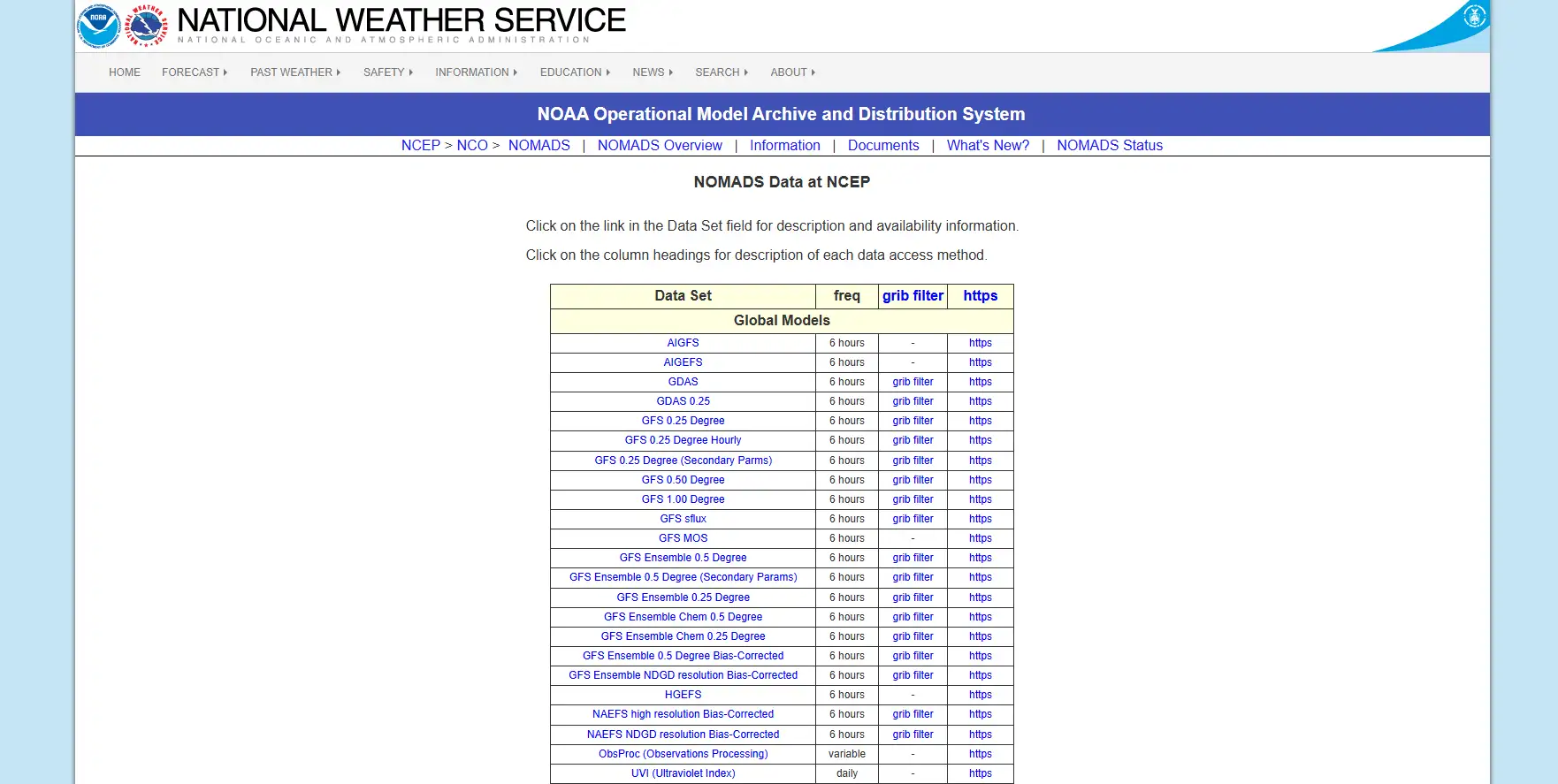
风场数据 (Wind Field Data)通常包含在综合气象模型数据中,最常用且覆盖全球的是 GFS (Global Forecast System) 系列。
全球球范围的风场数据,请选择以下任意一项(精度不同):
- GFS 0.25 Degree (精度最高,0.25度,约28公里)
- GFS 0.50 Degree (精度中等,0.50度)
- GFS 1.00 Degree (精度较低,1.00度)
根据需要,点击对应的grib filter
因为我们需要实现三维效果的风场,所以需要获取到U、V、W三个分量(必选)和多个气压层(根据需要选择)的数据。
- U 分量:表示东西方向的风速。
- 正值:西风(风从西边吹来,向东吹)。
- 负值:东风(风从东边吹来,向西吹)。
- V 分量:表示南北方向的风速。
- 正值:南风(风从南边吹来,向北吹)。
- 负值:北风(风从北边吹来,向南吹)。
- W 分量:表示垂直方向的风速。
- 正值:上升气流。
- 负值:下沉气流。
- 1000 mb、925 mb、850 mb、700 mb、500 mb、300 mb、200 mb 等
- 每个气压层对应一个高度,组合起来就是 3D
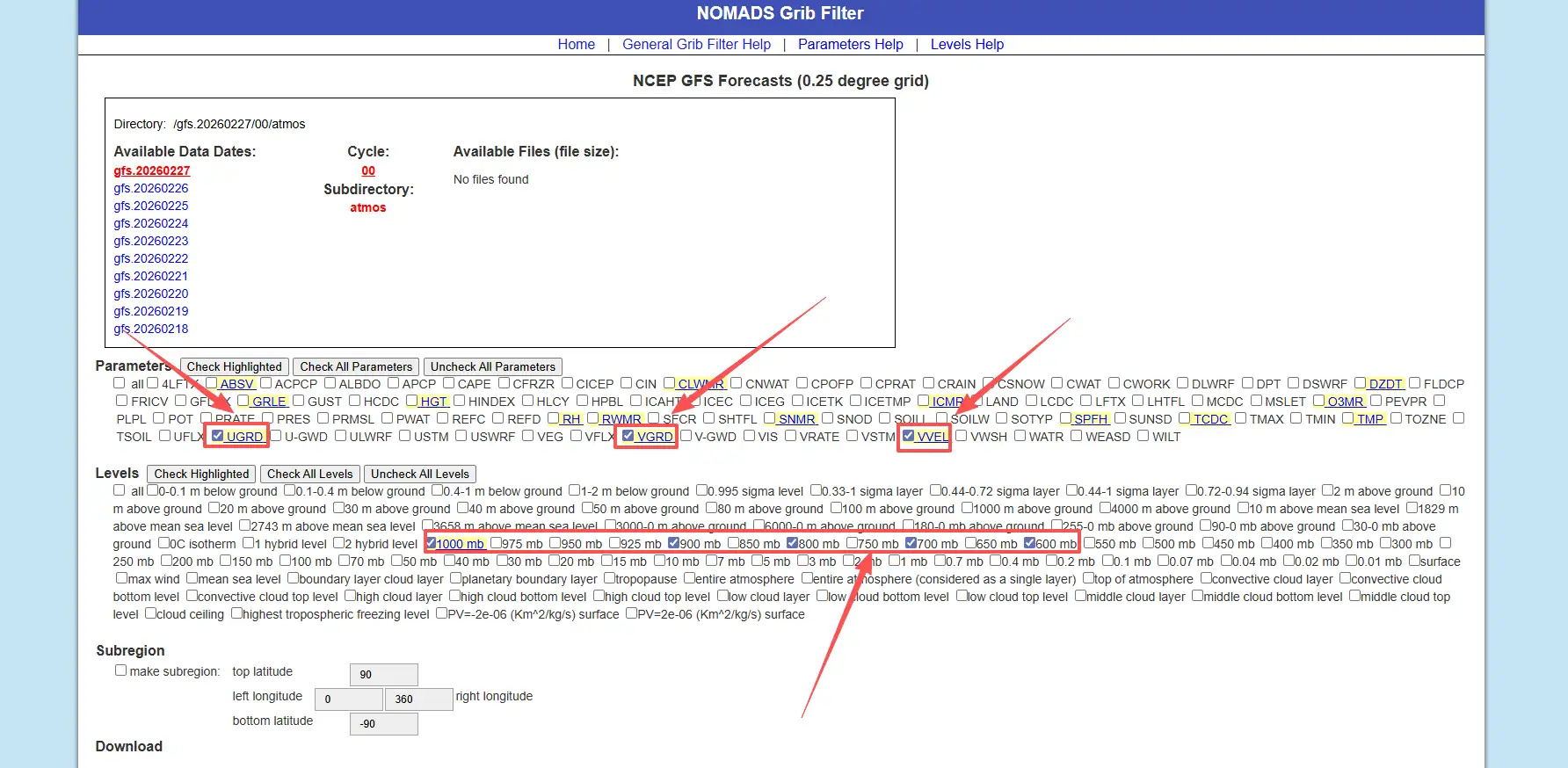
Subregion:根据需要选择,这里我使用全球范围数据所以没有勾选
数据日期,注意检查选择的日期是否有可用数据,选择anl格式
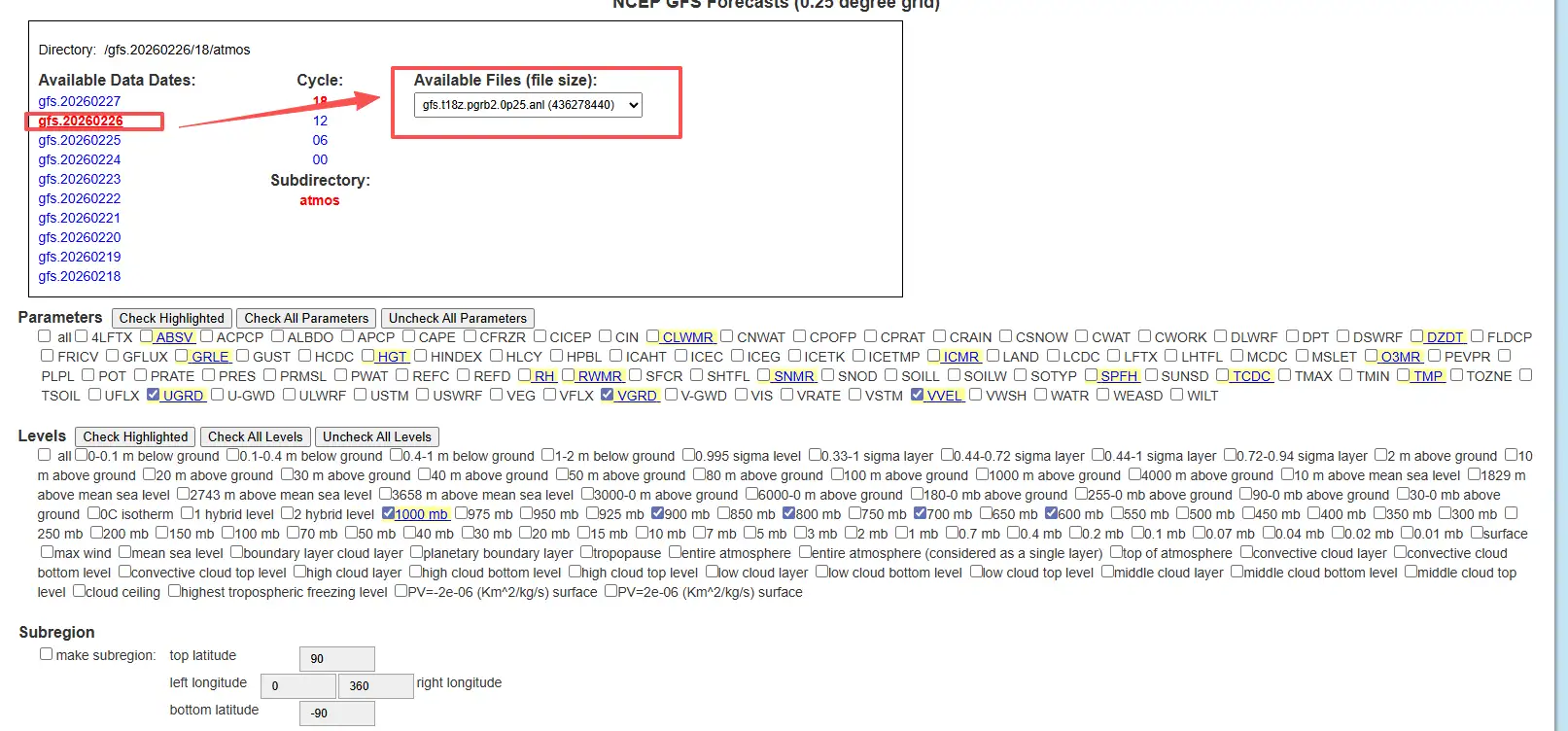
选择完成之后点击Start download按钮,浏览器即开始下载anl文件
自动下载数据
手动下载适合调试,但一旦要做“每日更新的风场动画”,就离不开脚本,以下代码由ai给出,笔者尚未测试,读者请自行测试
#!/usr/bin/env python
# -*- coding: utf-8 -*-
"""
从 NOMADS 自动下载 GFS 0.25° GRIB2 文件的简单脚本。

- 支持指定日期、起报时间、预报小时
- 默认下载“最新起报时间 + f000 分析场”
"""

import os
import sys
import datetime as dt
import requests

NOMADS_BASE = "https://nomads.ncep.noaa.gov/pub/data/nccf/com/gfs/prod"


def build_gfs_0p25_url(date, cycle, fhour):
    """
    构造 GFS 0.25° GRIB2 文件的下载 URL

    :param date: dt.date 对象
    :param cycle: 起报小时字符串, e.g. "00", "06", "12", "18"
    :param fhour: 预报小时整数, e.g. 0, 6, 12 ...
    """
    ymd = date.strftime("%Y%m%d")
    # 文件名形如: gfs.t00z.pgrb2.0p25.f000
    fname = f"gfs.t{cycle}z.pgrb2.0p25.f{fhour:03d}"

    url = f"{NOMADS_BASE}/gfs.{ymd}/{cycle}/atmos/{fname}"
    return url, fname


def download_file(url, out_path, chunk_size=1024 * 1024):
    """
    通用下载函数,带简单的进度打印
    """
    print(f"[INFO] Downloading: {url}")
    resp = requests.get(url, stream=True, timeout=60)
    resp.raise_for_status()

    os.makedirs(os.path.dirname(out_path), exist_ok=True)

    total = int(resp.headers.get("Content-Length", 0))
    downloaded = 0

    with open(out_path, "wb") as f:
        for chunk in resp.iter_content(chunk_size=chunk_size):
            if not chunk:
                continue
            f.write(chunk)
            downloaded += len(chunk)
            if total > 0:
                done = int(50 * downloaded / total)
                sys.stdout.write(
                    "\r[INFO] Progress: [{}{}] {:.1f}%".format(
                        "#" * done,
                        "." * (50 - done),
                        100 * downloaded / total,
                    )
                )
                sys.stdout.flush()

    print(f"\n[INFO] Saved to {out_path}")


def download_latest_gfs(out_dir, fhour=0, cycle=None):
    """
    下载最新一套 GFS 0.25° 数据中的一个预报时次

    :param out_dir: 输出目录
    :param fhour: 预报小时 (0 = 分析场)
    :param cycle: 可指定 "00"/"06"/"12"/"18",不指定则自动选最近的一个
    """
    now_utc = dt.datetime.utcnow()

    if cycle is None:
        # 简单根据当前 UTC 小时选一个最近的 cycle
        hour = now_utc.hour
        if hour >= 18:
            cycle = "18"
        elif hour >= 12:
            cycle = "12"
        elif hour >= 6:
            cycle = "06"
        else:
            cycle = "00"

    # 如果当前时间还没到该 cycle 完整产出,就往前推一天
    date = now_utc.date()
    if now_utc.hour < int(cycle):
        date = date - dt.timedelta(days=1)

    url, fname = build_gfs_0p25_url(date, cycle, fhour)
    out_path = os.path.join(out_dir, fname)

    download_file(url, out_path)
    return out_path


if __name__ == "__main__":
    # 示例用法:python download_gfs_grib2.py [out_dir] [fhour]
    if len(sys.argv) >= 2:
        out_dir = sys.argv[1]
    else:
        out_dir = "./data/raw"

    if len(sys.argv) >= 3:
        fhour = int(sys.argv[2])
    else:
        fhour = 0  # 默认下载分析场

    download_latest_gfs(out_dir, fhour=fhour)
数据处理
因为下载数据是anl的GRIB2文件,前端无法直接读取,所以要转换JSON格式,这里直接给出代码,输入输出路径改成自己的即可
"""
grib2_to_wind3d.py
==================
Convert GFS GRIB2 file to Wind3D JSON format (full global, no region crop).
Extracts U (east-west wind), V (north-south wind), W (vertical velocity)
at multiple pressure levels.

Usage:
  .venv\\Scripts\\python.exe scripts\\grib2_to_wind3d.py

Dependencies:
  pip install xarray cfgrib eccodes numpy
"""

import os
import sys
import io
import json
import numpy as np
import xarray as xr

# Fix Windows console encoding
sys.stdout = io.TextIOWrapper(sys.stdout.buffer, encoding="utf-8", errors="replace")
sys.stderr = io.TextIOWrapper(sys.stderr.buffer, encoding="utf-8", errors="replace")

# ============================================================
# Configuration
# ============================================================

INPUT_FILE = os.path.join("public", "gfs.t00z.pgrb2.1p00 (1).anl")
OUTPUT_FILE = os.path.join("public", "wind3d.json")

# Target pressure levels (hPa) - will match any available in the file
TARGET_LEVELS = [1000, 975, 950, 925, 900, 850, 800, 700, 600, 500, 400, 300, 250, 200, 150, 100]

# Approximate height (meters) for each pressure level
LEVEL_HEIGHTS = {
    1000: 100, 975: 300, 950: 500, 925: 750,
    900: 1000, 850: 1500, 800: 2000, 700: 3000,
    600: 4200, 500: 5500, 400: 7200, 300: 9000,
    250: 10400, 200: 12000, 150: 13500, 100: 16000,
}


# ============================================================
# Helper Functions
# ============================================================

def open_grib_variable(filepath, short_name):
    """Read a single variable from GRIB2 at isobaric levels."""
    try:
        ds = xr.open_dataset(
            filepath,
            engine="cfgrib",
            backend_kwargs={
                "filter_by_keys": {
                    "typeOfLevel": "isobaricInhPa",
                    "shortName": short_name,
                }
            },
        )
        return ds
    except Exception as e:
        print(f"  [WARN] Cannot read variable '{short_name}': {e}")
        return None


def get_levels_from_dataset(ds):
    """Extract available pressure levels from dataset."""
    level_dim = "isobaricInhPa"
    if level_dim in ds.dims:
        return sorted(ds[level_dim].values.tolist()), True
    elif level_dim in ds.coords:
        val = float(ds[level_dim].values)
        return [val], False
    else:
        return [], False


def select_levels(da, level_dim, levels, is_multi_level):
    """Select pressure levels from a DataArray (no geographic cropping)."""
    if is_multi_level and level_dim in da.dims:
        return da.sel(**{level_dim: levels})
    return da


# ============================================================
# Main
# ============================================================

def main():
    print("=" * 60)
    print("  GFS GRIB2 -> Wind3D JSON Converter (Full Global)")
    print("=" * 60)

    if not os.path.exists(INPUT_FILE):
        print(f"\n[ERROR] File not found: {INPUT_FILE}")
        sys.exit(1)

    file_size_mb = os.path.getsize(INPUT_FILE) / (1024 * 1024)
    print(f"\nInput:  {INPUT_FILE} ({file_size_mb:.1f} MB)")
    print(f"Output: {OUTPUT_FILE}")
    print(f"Mode:   Full global (no region crop)")

    # ----------------------------------------------------------
    # 1. Read U, V, W separately
    # ----------------------------------------------------------
    print("\n[1/6] Reading GRIB2 data...")

    print("  -> U component (UGRD)...")
    u_ds = open_grib_variable(INPUT_FILE, "u")

    print("  -> V component (VGRD)...")
    v_ds = open_grib_variable(INPUT_FILE, "v")

    print("  -> W component (VVEL/omega)...")
    w_ds = open_grib_variable(INPUT_FILE, "w")

    if u_ds is None or v_ds is None:
        print("\n[ERROR] Cannot read U or V wind components!")
        sys.exit(1)

    u_var = list(u_ds.data_vars)[0]
    v_var = list(v_ds.data_vars)[0]
    print(f"\n  U var: '{u_var}', dims: {list(u_ds[u_var].dims)}")
    print(f"  V var: '{v_var}', dims: {list(v_ds[v_var].dims)}")
    if w_ds is not None:
        w_var = list(w_ds.data_vars)[0]
        print(f"  W var: '{w_var}', dims: {list(w_ds[w_var].dims)}")

    # ----------------------------------------------------------
    # 2. Determine available pressure levels
    # ----------------------------------------------------------
    print("\n[2/6] Analyzing pressure levels...")

    available_levels, is_multi_level = get_levels_from_dataset(u_ds)
    print(f"  Available: {available_levels}")

    selected_levels = sorted([l for l in TARGET_LEVELS if l in available_levels])
    if not selected_levels:
        if available_levels:
            selected_levels = sorted([int(l) for l in available_levels])
            print(f"  [INFO] No target levels matched, using all: {selected_levels}")
        else:
            print(f"  [ERROR] No pressure levels found!")
            sys.exit(1)
    else:
        print(f"  Selected: {selected_levels}")

    single_level = len(selected_levels) == 1
    if single_level:
        print(f"  [INFO] Only 1 level, will replicate across layers.")

    # ----------------------------------------------------------
    # 3. Select levels (full spatial extent, no cropping)
    # ----------------------------------------------------------
    print("\n[3/6] Selecting levels (full spatial extent)...")

    level_dim = "isobaricInhPa"

    u_data = select_levels(u_ds[u_var], level_dim, selected_levels, is_multi_level)
    v_data = select_levels(v_ds[v_var], level_dim, selected_levels, is_multi_level)

    has_w = False
    if w_ds is not None:
        w_var = list(w_ds.data_vars)[0]
        try:
            w_data = select_levels(w_ds[w_var], level_dim, selected_levels, is_multi_level)
            has_w = True
        except Exception as e:
            print(f"  [WARN] W selection failed: {e}")

    # ----------------------------------------------------------
    # 4. Convert to numpy arrays
    # ----------------------------------------------------------
    print("\n[4/6] Processing data...")

    u_arr = u_data.values
    v_arr = v_data.values

    if u_arr.ndim == 2:
        u_arr = u_arr[np.newaxis, :, :]
        v_arr = v_arr[np.newaxis, :, :]

    if has_w:
        w_arr = w_data.values
        if w_arr.ndim == 2:
            w_arr = w_arr[np.newaxis, :, :]
        # Convert omega (Pa/s) -> vertical velocity (m/s)
        w_arr = -w_arr / (1.225 * 9.8)
        print("  [OK] W: converted from Pa/s to m/s")
    else:
        w_arr = np.zeros_like(u_arr)
        print("  [INFO] W: not found, using zeros")

    # Replace NaN with 0
    u_arr = np.nan_to_num(u_arr, nan=0.0)
    v_arr = np.nan_to_num(v_arr, nan=0.0)
    w_arr = np.nan_to_num(w_arr, nan=0.0)

    # Get coordinates
    lons = u_data.longitude.values
    lats = u_data.latitude.values

    # Ensure latitude ascending (south -> north)
    if len(lats) > 1 and lats[0] > lats[-1]:
        lats = lats[::-1]
        u_arr = u_arr[:, ::-1, :]
        v_arr = v_arr[:, ::-1, :]
        w_arr = w_arr[:, ::-1, :]

    nz_raw, ny, nx = u_arr.shape

    # If single level, replicate
    if single_level and len(TARGET_LEVELS) > 1:
        nz_target = len(TARGET_LEVELS)
        u_arr = np.repeat(u_arr, nz_target, axis=0)
        v_arr = np.repeat(v_arr, nz_target, axis=0)
        w_arr = np.repeat(w_arr, nz_target, axis=0)
        output_levels = TARGET_LEVELS
        print(f"  [INFO] Replicated single level to {nz_target} layers")
    else:
        output_levels = selected_levels

    nz, ny, nx = u_arr.shape

    print(f"\n  Grid: {nx} x {ny} x {nz} (lon x lat x levels)")
    print(f"  Lon:  {lons[0]:.2f} to {lons[-1]:.2f}")
    print(f"  Lat:  {lats[0]:.2f} to {lats[-1]:.2f}")
    print(f"  Levels: {output_levels}")
    print(f"  U: [{u_arr.min():.2f}, {u_arr.max():.2f}] m/s")
    print(f"  V: [{v_arr.min():.2f}, {v_arr.max():.2f}] m/s")
    print(f"  W: [{w_arr.min():.6f}, {w_arr.max():.6f}] m/s")

    # ----------------------------------------------------------
    # 5. Build output JSON
    # ----------------------------------------------------------
    print(f"\n[5/6] Building JSON...")

    output = {
        "header": {
            "nx": int(nx),
            "ny": int(ny),
            "nz": int(nz),
            "lo1": round(float(lons[0]), 4),
            "lo2": round(float(lons[-1]), 4),
            "la1": round(float(lats[0]), 4),    # south (min lat)
            "la2": round(float(lats[-1]), 4),    # north (max lat)
            "dx": round(float(lons[1] - lons[0]), 4) if nx > 1 else 1.0,
            "dy": round(float(lats[1] - lats[0]), 4) if ny > 1 else 1.0,
            "levels": [int(l) for l in output_levels],
            "levelHeights": [LEVEL_HEIGHTS.get(int(l), 0) for l in output_levels],
            "uMin": round(float(u_arr.min()), 4),
            "uMax": round(float(u_arr.max()), 4),
            "vMin": round(float(v_arr.min()), 4),
            "vMax": round(float(v_arr.max()), 4),
            "wMin": round(float(w_arr.min()), 6),
            "wMax": round(float(w_arr.max()), 6),
        },
        "data": {
            "u": [round(float(x), 2) for x in u_arr.flatten()],
            "v": [round(float(x), 2) for x in v_arr.flatten()],
            "w": [round(float(x), 4) for x in w_arr.flatten()],
        },
    }

    # ----------------------------------------------------------
    # 6. Write file
    # ----------------------------------------------------------
    print(f"\n[6/6] Writing {OUTPUT_FILE}...")
    with open(OUTPUT_FILE, "w") as f:
        json.dump(output, f, separators=(",", ":"))

    out_size = os.path.getsize(OUTPUT_FILE)
    unit = "KB" if out_size < 1024 * 1024 else "MB"
    size_val = out_size / 1024 if unit == "KB" else out_size / (1024 * 1024)
    print(f"  File size: {size_val:.1f} {unit}")

    total_points = nx * ny * nz
    print(f"  Total points: {total_points} ({nx}x{ny}x{nz})")

    print(f"\n{'=' * 60}")
    print(f"  DONE! Full global wind3d.json is ready.")
    print(f"{'=' * 60}")


if __name__ == "__main__":
    main()
输出格式说明
header.nx/ny/nz:经纬高度网格数header.lo1/la1:子集网格的起始经纬度(通常是最小经度、最小纬度)header.dx/dy:格点间距(度)header.levels[]:等压面层(hPa)header.levelHeights[]:每层的近似高度(m,做可视化厚度/层间距用)data.u/v/w:展平数组(长度均为nx*ny*nz)
下一篇会讲什么
下一篇《Cesium 里怎么实现 Wind3D》会聚焦:
- 为什么用 WebGL2 3D Texture 存风场
- 为什么用 ping-pong 粒子状态纹理 + MRT 做 GPU 仿真
- 如何把 归一化粒子坐标 → 经纬高 → ECEF → 局部 ENU,让箭头贴合球面
- 如何做 范围裁剪/粒子密度自适应/GeoJSON 一键设定范围
参考资料
- 槑的秘密基地. Cesium 中实现三维风场粒子效果 [EB/OL]. https://www.liaomz.top/2025/09/11/cesium-zhong-shi-xian-san-wei-feng-chang-li-zi-xiao-guo/, 2025-09-11.
- jiawanlong. Cesium-Examples 风场 [EB/OL]. https://jiawanlong.github.io/Cesium-Examples/examples/cesiumEx/editor.html#8.1.4%E3%80%81%E9%A3%8E%E5%9C%BA.
喜欢这篇文章的人也看了



评论
匿名评论隐私政策
✅ 你无需删除空行,直接评论以获取最佳展示效果