数据下载
手动数据下载
这里我使用的是贾宛龙大佬案例里给的地址下载数据源https://nomads.ncep.noaa.gov/
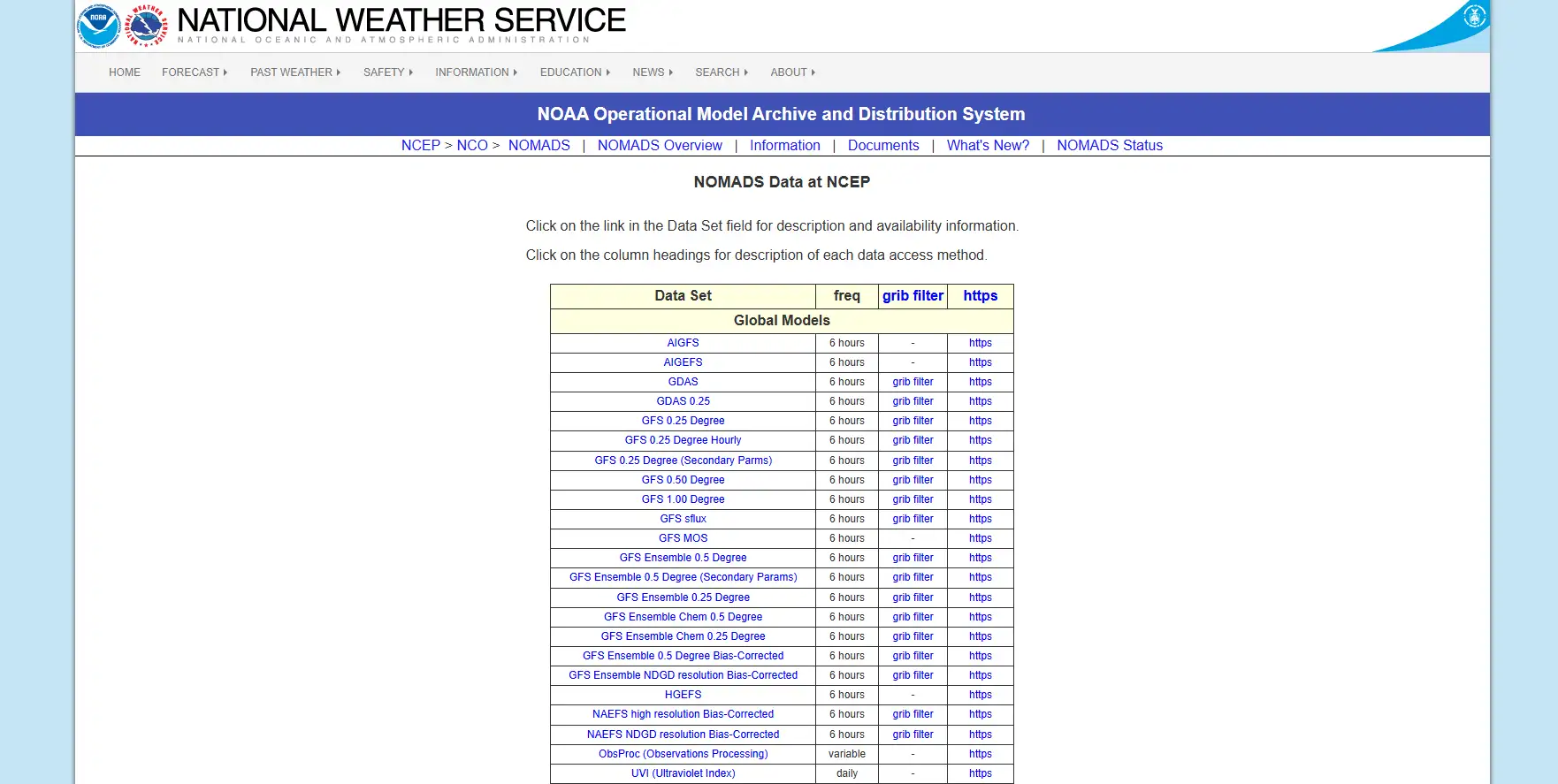
风场数据 (Wind Field Data)通常包含在综合气象模型数据中,最常用且覆盖全球的是 GFS (Global Forecast System) 系列。
全球球范围的风场数据,请选择以下任意一项(精度不同):
- GFS 0.25 Degree (精度最高,0.25度,约28公里)
- GFS 0.50 Degree (精度中等,0.50度)
- GFS 1.00 Degree (精度较低,1.00度)
根据需要,点击对应的grib filter
因为我们需要实现三维效果的风场,所以需要获取到U、V、W三个分量(必选)和多个气压层(根据需要选择)的数据。
- U 分量:表示东西方向的风速。
- 正值:西风(风从西边吹来,向东吹)。
- 负值:东风(风从东边吹来,向西吹)。
- V 分量:表示南北方向的风速。
- 正值:南风(风从南边吹来,向北吹)。
- 负值:北风(风从北边吹来,向南吹)。
- W 分量:表示垂直方向的风速。
- 正值:上升气流。
- 负值:下沉气流。
- 1000 mb、925 mb、850 mb、700 mb、500 mb、300 mb、200 mb 等
- 每个气压层对应一个高度,组合起来就是 3D
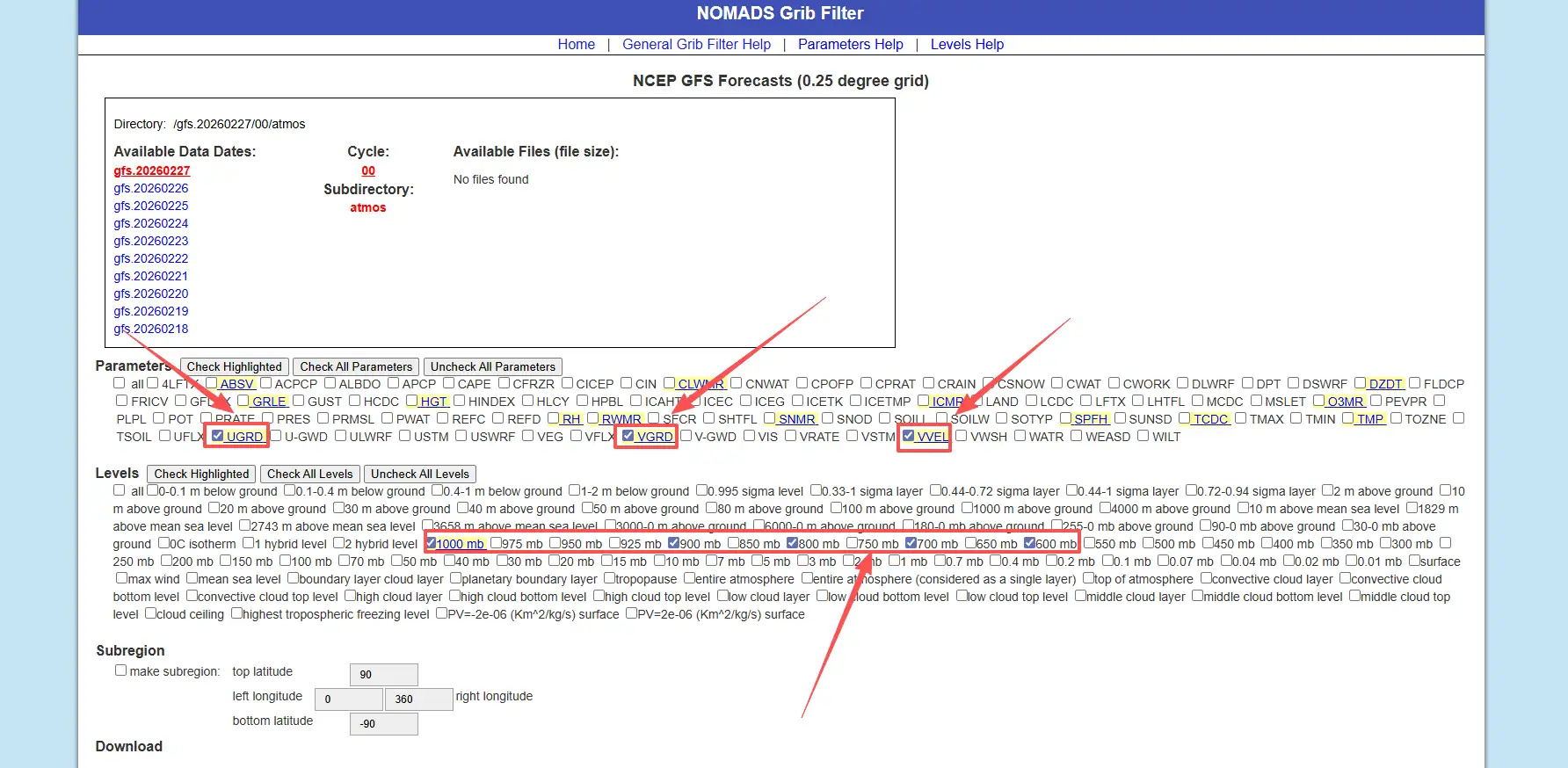
Subregion:根据需要选择,这里我使用全球范围数据所以没有勾选
数据日期,注意检查选择的日期是否有可用数据,选择anl格式
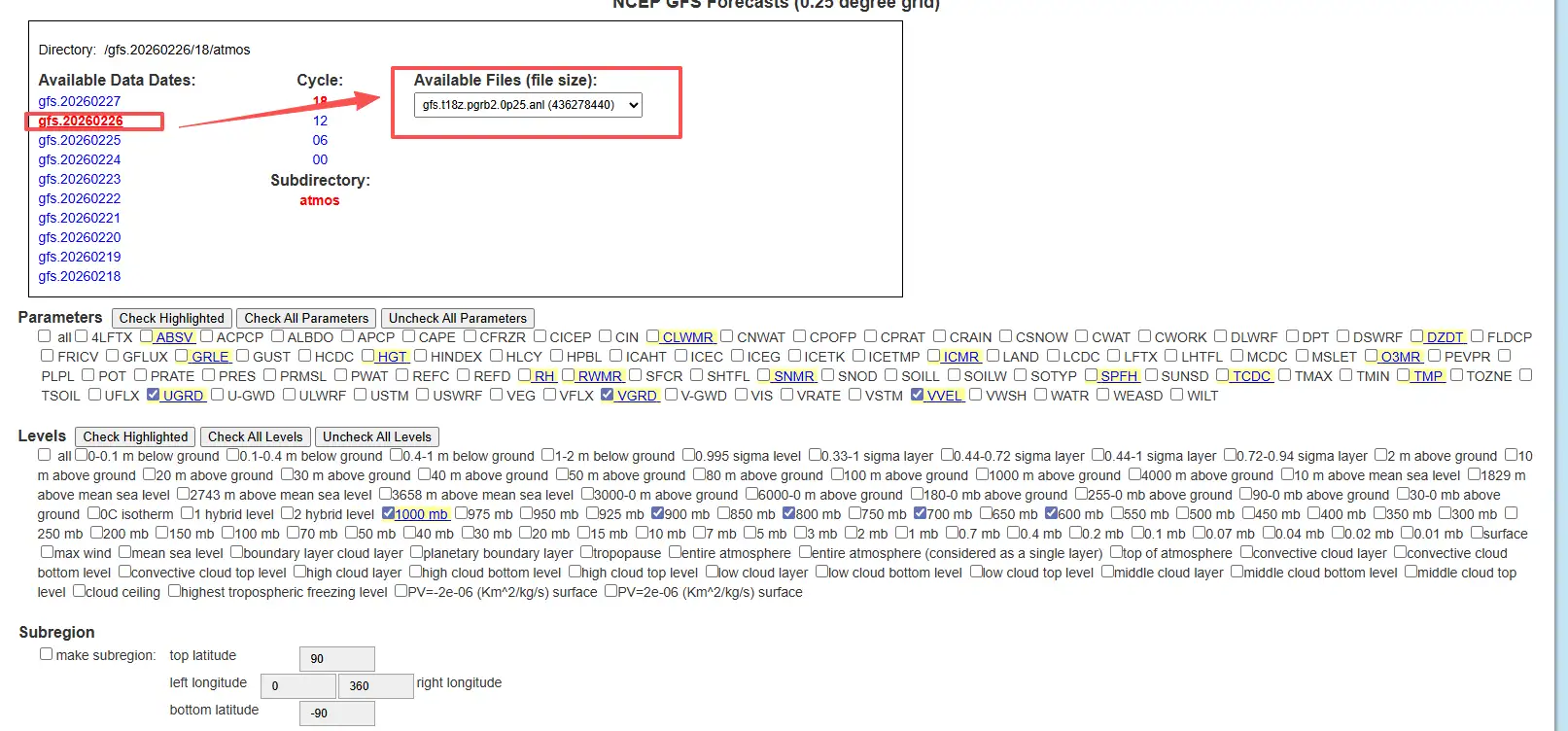
选择完成之后点击Start download按钮,浏览器即开始下载anl文件
自动下载数据
手动下载适合调试,但一旦要做“每日更新的风场动画”,就离不开脚本,以下代码由ai给出,笔者尚未测试,读者请自行测试
#!/usr/bin/env python# -*- coding: utf-8 -*-"""从 NOMADS 自动下载 GFS 0.25° GRIB2 文件的简单脚本。
- 支持指定日期、起报时间、预报小时- 默认下载“最新起报时间 + f000 分析场”"""
import osimport sysimport datetime as dtimport requests
NOMADS_BASE = "https://nomads.ncep.noaa.gov/pub/data/nccf/com/gfs/prod"
def build_gfs_0p25_url(date, cycle, fhour): """ 构造 GFS 0.25° GRIB2 文件的下载 URL
:param date: dt.date 对象 :param cycle: 起报小时字符串, e.g. "00", "06", "12", "18" :param fhour: 预报小时整数, e.g. 0, 6, 12 ... """ ymd = date.strftime("%Y%m%d") # 文件名形如: gfs.t00z.pgrb2.0p25.f000 fname = f"gfs.t{cycle}z.pgrb2.0p25.f{fhour:03d}"
url = f"{NOMADS_BASE}/gfs.{ymd}/{cycle}/atmos/{fname}" return url, fname
def download_file(url, out_path, chunk_size=1024 * 1024): """ 通用下载函数,带简单的进度打印 """ print(f"[INFO] Downloading: {url}") resp = requests.get(url, stream=True, timeout=60) resp.raise_for_status()
os.makedirs(os.path.dirname(out_path), exist_ok=True)
total = int(resp.headers.get("Content-Length", 0)) downloaded = 0
with open(out_path, "wb") as f: for chunk in resp.iter_content(chunk_size=chunk_size): if not chunk: continue f.write(chunk) downloaded += len(chunk) if total > 0: done = int(50 * downloaded / total) sys.stdout.write( "\r[INFO] Progress: [{}{}] {:.1f}%".format( "#" * done, "." * (50 - done), 100 * downloaded / total, ) ) sys.stdout.flush()
print(f"\n[INFO] Saved to {out_path}")
def download_latest_gfs(out_dir, fhour=0, cycle=None): """ 下载最新一套 GFS 0.25° 数据中的一个预报时次
:param out_dir: 输出目录 :param fhour: 预报小时 (0 = 分析场) :param cycle: 可指定 "00"/"06"/"12"/"18",不指定则自动选最近的一个 """ now_utc = dt.datetime.utcnow()
if cycle is None: # 简单根据当前 UTC 小时选一个最近的 cycle hour = now_utc.hour if hour >= 18: cycle = "18" elif hour >= 12: cycle = "12" elif hour >= 6: cycle = "06" else: cycle = "00"
# 如果当前时间还没到该 cycle 完整产出,就往前推一天 date = now_utc.date() if now_utc.hour < int(cycle): date = date - dt.timedelta(days=1)
url, fname = build_gfs_0p25_url(date, cycle, fhour) out_path = os.path.join(out_dir, fname)
download_file(url, out_path) return out_path
if __name__ == "__main__": # 示例用法:python download_gfs_grib2.py [out_dir] [fhour] if len(sys.argv) >= 2: out_dir = sys.argv[1] else: out_dir = "./data/raw"
if len(sys.argv) >= 3: fhour = int(sys.argv[2]) else: fhour = 0 # 默认下载分析场
download_latest_gfs(out_dir, fhour=fhour)数据处理
因为下载数据是anl的GRIB2文件,前端无法直接读取,所以要转换JSON格式,这里直接给出代码,输入输出路径改成自己的即可
"""grib2_to_wind3d.py==================Convert GFS GRIB2 file to Wind3D JSON format (full global, no region crop).Extracts U (east-west wind), V (north-south wind), W (vertical velocity)at multiple pressure levels.
Usage: .venv\\Scripts\\python.exe scripts\\grib2_to_wind3d.py
Dependencies: pip install xarray cfgrib eccodes numpy"""
import osimport sysimport ioimport jsonimport numpy as npimport xarray as xr
# Fix Windows console encodingsys.stdout = io.TextIOWrapper(sys.stdout.buffer, encoding="utf-8", errors="replace")sys.stderr = io.TextIOWrapper(sys.stderr.buffer, encoding="utf-8", errors="replace")
# ============================================================# Configuration# ============================================================
INPUT_FILE = os.path.join("public", "gfs.t00z.pgrb2.1p00 (1).anl")OUTPUT_FILE = os.path.join("public", "wind3d.json")
# Target pressure levels (hPa) - will match any available in the fileTARGET_LEVELS = [1000, 975, 950, 925, 900, 850, 800, 700, 600, 500, 400, 300, 250, 200, 150, 100]
# Approximate height (meters) for each pressure levelLEVEL_HEIGHTS = { 1000: 100, 975: 300, 950: 500, 925: 750, 900: 1000, 850: 1500, 800: 2000, 700: 3000, 600: 4200, 500: 5500, 400: 7200, 300: 9000, 250: 10400, 200: 12000, 150: 13500, 100: 16000,}
# ============================================================# Helper Functions# ============================================================
def open_grib_variable(filepath, short_name): """Read a single variable from GRIB2 at isobaric levels.""" try: ds = xr.open_dataset( filepath, engine="cfgrib", backend_kwargs={ "filter_by_keys": { "typeOfLevel": "isobaricInhPa", "shortName": short_name, } }, ) return ds except Exception as e: print(f" [WARN] Cannot read variable '{short_name}': {e}") return None
def get_levels_from_dataset(ds): """Extract available pressure levels from dataset.""" level_dim = "isobaricInhPa" if level_dim in ds.dims: return sorted(ds[level_dim].values.tolist()), True elif level_dim in ds.coords: val = float(ds[level_dim].values) return [val], False else: return [], False
def select_levels(da, level_dim, levels, is_multi_level): """Select pressure levels from a DataArray (no geographic cropping).""" if is_multi_level and level_dim in da.dims: return da.sel(**{level_dim: levels}) return da
# ============================================================# Main# ============================================================
def main(): print("=" * 60) print(" GFS GRIB2 -> Wind3D JSON Converter (Full Global)") print("=" * 60)
if not os.path.exists(INPUT_FILE): print(f"\n[ERROR] File not found: {INPUT_FILE}") sys.exit(1)
file_size_mb = os.path.getsize(INPUT_FILE) / (1024 * 1024) print(f"\nInput: {INPUT_FILE} ({file_size_mb:.1f} MB)") print(f"Output: {OUTPUT_FILE}") print(f"Mode: Full global (no region crop)")
# ---------------------------------------------------------- # 1. Read U, V, W separately # ---------------------------------------------------------- print("\n[1/6] Reading GRIB2 data...")
print(" -> U component (UGRD)...") u_ds = open_grib_variable(INPUT_FILE, "u")
print(" -> V component (VGRD)...") v_ds = open_grib_variable(INPUT_FILE, "v")
print(" -> W component (VVEL/omega)...") w_ds = open_grib_variable(INPUT_FILE, "w")
if u_ds is None or v_ds is None: print("\n[ERROR] Cannot read U or V wind components!") sys.exit(1)
u_var = list(u_ds.data_vars)[0] v_var = list(v_ds.data_vars)[0] print(f"\n U var: '{u_var}', dims: {list(u_ds[u_var].dims)}") print(f" V var: '{v_var}', dims: {list(v_ds[v_var].dims)}") if w_ds is not None: w_var = list(w_ds.data_vars)[0] print(f" W var: '{w_var}', dims: {list(w_ds[w_var].dims)}")
# ---------------------------------------------------------- # 2. Determine available pressure levels # ---------------------------------------------------------- print("\n[2/6] Analyzing pressure levels...")
available_levels, is_multi_level = get_levels_from_dataset(u_ds) print(f" Available: {available_levels}")
selected_levels = sorted([l for l in TARGET_LEVELS if l in available_levels]) if not selected_levels: if available_levels: selected_levels = sorted([int(l) for l in available_levels]) print(f" [INFO] No target levels matched, using all: {selected_levels}") else: print(f" [ERROR] No pressure levels found!") sys.exit(1) else: print(f" Selected: {selected_levels}")
single_level = len(selected_levels) == 1 if single_level: print(f" [INFO] Only 1 level, will replicate across layers.")
# ---------------------------------------------------------- # 3. Select levels (full spatial extent, no cropping) # ---------------------------------------------------------- print("\n[3/6] Selecting levels (full spatial extent)...")
level_dim = "isobaricInhPa"
u_data = select_levels(u_ds[u_var], level_dim, selected_levels, is_multi_level) v_data = select_levels(v_ds[v_var], level_dim, selected_levels, is_multi_level)
has_w = False if w_ds is not None: w_var = list(w_ds.data_vars)[0] try: w_data = select_levels(w_ds[w_var], level_dim, selected_levels, is_multi_level) has_w = True except Exception as e: print(f" [WARN] W selection failed: {e}")
# ---------------------------------------------------------- # 4. Convert to numpy arrays # ---------------------------------------------------------- print("\n[4/6] Processing data...")
u_arr = u_data.values v_arr = v_data.values
if u_arr.ndim == 2: u_arr = u_arr[np.newaxis, :, :] v_arr = v_arr[np.newaxis, :, :]
if has_w: w_arr = w_data.values if w_arr.ndim == 2: w_arr = w_arr[np.newaxis, :, :] # Convert omega (Pa/s) -> vertical velocity (m/s) w_arr = -w_arr / (1.225 * 9.8) print(" [OK] W: converted from Pa/s to m/s") else: w_arr = np.zeros_like(u_arr) print(" [INFO] W: not found, using zeros")
# Replace NaN with 0 u_arr = np.nan_to_num(u_arr, nan=0.0) v_arr = np.nan_to_num(v_arr, nan=0.0) w_arr = np.nan_to_num(w_arr, nan=0.0)
# Get coordinates lons = u_data.longitude.values lats = u_data.latitude.values
# Ensure latitude ascending (south -> north) if len(lats) > 1 and lats[0] > lats[-1]: lats = lats[::-1] u_arr = u_arr[:, ::-1, :] v_arr = v_arr[:, ::-1, :] w_arr = w_arr[:, ::-1, :]
nz_raw, ny, nx = u_arr.shape
# If single level, replicate if single_level and len(TARGET_LEVELS) > 1: nz_target = len(TARGET_LEVELS) u_arr = np.repeat(u_arr, nz_target, axis=0) v_arr = np.repeat(v_arr, nz_target, axis=0) w_arr = np.repeat(w_arr, nz_target, axis=0) output_levels = TARGET_LEVELS print(f" [INFO] Replicated single level to {nz_target} layers") else: output_levels = selected_levels
nz, ny, nx = u_arr.shape
print(f"\n Grid: {nx} x {ny} x {nz} (lon x lat x levels)") print(f" Lon: {lons[0]:.2f} to {lons[-1]:.2f}") print(f" Lat: {lats[0]:.2f} to {lats[-1]:.2f}") print(f" Levels: {output_levels}") print(f" U: [{u_arr.min():.2f}, {u_arr.max():.2f}] m/s") print(f" V: [{v_arr.min():.2f}, {v_arr.max():.2f}] m/s") print(f" W: [{w_arr.min():.6f}, {w_arr.max():.6f}] m/s")
# ---------------------------------------------------------- # 5. Build output JSON # ---------------------------------------------------------- print(f"\n[5/6] Building JSON...")
output = { "header": { "nx": int(nx), "ny": int(ny), "nz": int(nz), "lo1": round(float(lons[0]), 4), "lo2": round(float(lons[-1]), 4), "la1": round(float(lats[0]), 4), # south (min lat) "la2": round(float(lats[-1]), 4), # north (max lat) "dx": round(float(lons[1] - lons[0]), 4) if nx > 1 else 1.0, "dy": round(float(lats[1] - lats[0]), 4) if ny > 1 else 1.0, "levels": [int(l) for l in output_levels], "levelHeights": [LEVEL_HEIGHTS.get(int(l), 0) for l in output_levels], "uMin": round(float(u_arr.min()), 4), "uMax": round(float(u_arr.max()), 4), "vMin": round(float(v_arr.min()), 4), "vMax": round(float(v_arr.max()), 4), "wMin": round(float(w_arr.min()), 6), "wMax": round(float(w_arr.max()), 6), }, "data": { "u": [round(float(x), 2) for x in u_arr.flatten()], "v": [round(float(x), 2) for x in v_arr.flatten()], "w": [round(float(x), 4) for x in w_arr.flatten()], }, }
# ---------------------------------------------------------- # 6. Write file # ---------------------------------------------------------- print(f"\n[6/6] Writing {OUTPUT_FILE}...") with open(OUTPUT_FILE, "w") as f: json.dump(output, f, separators=(",", ":"))
out_size = os.path.getsize(OUTPUT_FILE) unit = "KB" if out_size < 1024 * 1024 else "MB" size_val = out_size / 1024 if unit == "KB" else out_size / (1024 * 1024) print(f" File size: {size_val:.1f} {unit}")
total_points = nx * ny * nz print(f" Total points: {total_points} ({nx}x{ny}x{nz})")
print(f"\n{'=' * 60}") print(f" DONE! Full global wind3d.json is ready.") print(f"{'=' * 60}")
if __name__ == "__main__": main()输出格式说明
header.nx/ny/nz:经纬高度网格数header.lo1/la1:子集网格的起始经纬度(通常是最小经度、最小纬度)header.dx/dy:格点间距(度)header.levels[]:等压面层(hPa)header.levelHeights[]:每层的近似高度(m,做可视化厚度/层间距用)data.u/v/w:展平数组(长度均为nx*ny*nz)
下一篇会讲什么
下一篇《Cesium 里怎么实现 Wind3D》会聚焦:
- 为什么用 WebGL2 3D Texture 存风场
- 为什么用 ping-pong 粒子状态纹理 + MRT 做 GPU 仿真
- 如何把 归一化粒子坐标 → 经纬高 → ECEF → 局部 ENU,让箭头贴合球面
- 如何做 范围裁剪/粒子密度自适应/GeoJSON 一键设定范围
参考资料
- 槑的秘密基地. Cesium 中实现三维风场粒子效果 [EB/OL]. https://www.liaomz.top/2025/09/11/cesium-zhong-shi-xian-san-wei-feng-chang-li-zi-xiao-guo/, 2025-09-11.
- jiawanlong. Cesium-Examples 风场 [EB/OL]. https://jiawanlong.github.io/Cesium-Examples/examples/cesiumEx/editor.html#8.1.4%E3%80%81%E9%A3%8E%E5%9C%BA.